Transportation Management Software for Truck Brokers
Manage customers, carriers, loads, documents and profitability from one integrated platform.
SHIPX helps freight brokers automate dispatch, manage subcontracted carriers, process invoices with AI, monitor shipment progress and maintain complete operational visibility from quote to payment.
Request a Demo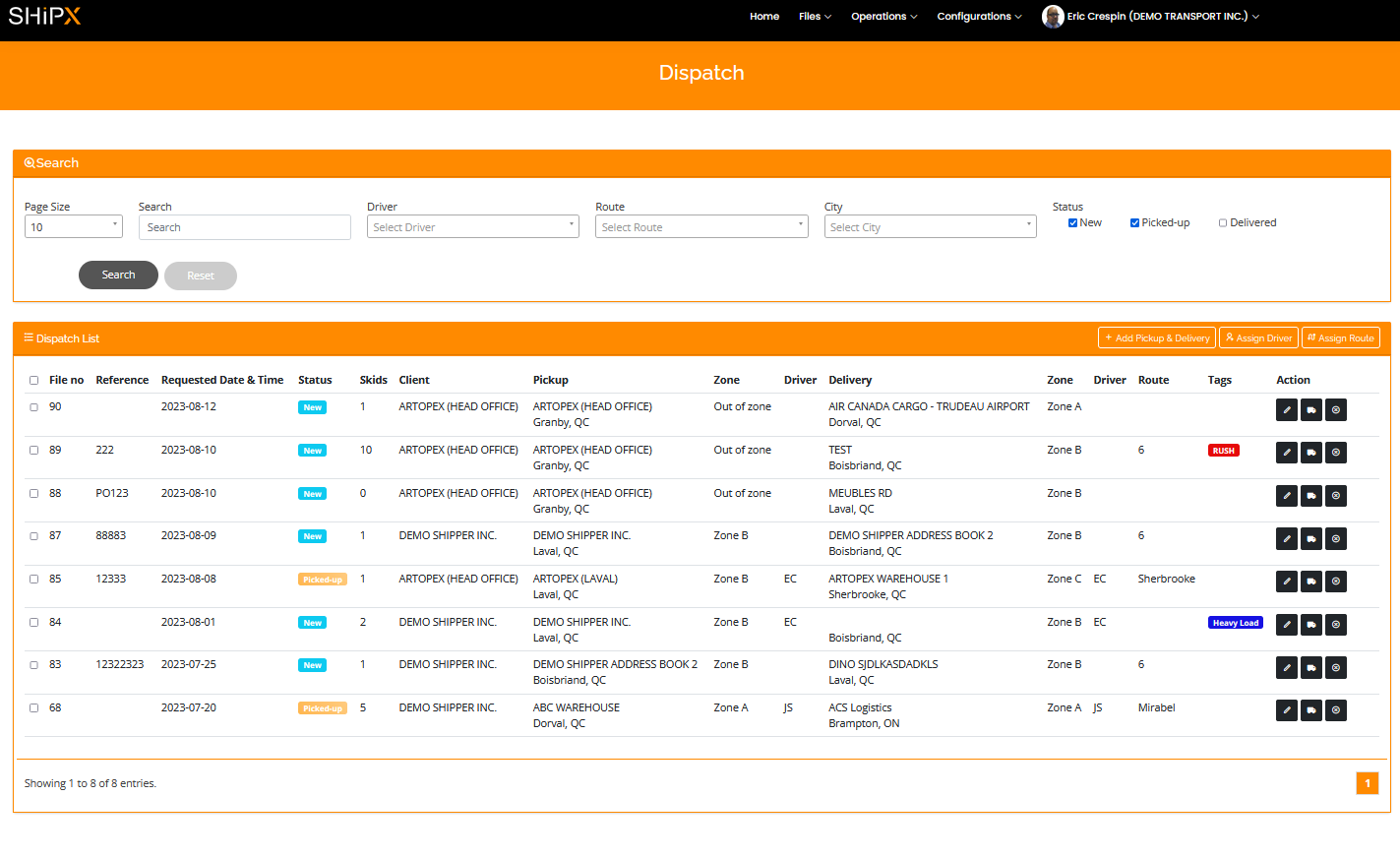
Why Truck Brokers Choose SHIPX

Find Carriers. Compare Rates. Choose Your Service.
Covering a load is a choice: which carrier, which service, at what price. SHIPX brings connected rates and your own carrier knowledge onto one screen.
- Request live rates from the carriers and rate services you are connected to
- Compare services, prices and expected delivery dates side by side
- See the full charge breakdown — freight, fuel, accessorials, surcharges and taxes
- Check the negotiated rates held on your own carrier records
- See who already ran this lane, and what they quoted and charged
- Reach beyond your own list through the ShipXZone directory
- Send spot quote requests and compare the answers side by side
- Book the carrier and print its own label right away — or SHIPX pallet and piece labels for everything else
Rates come from direct carrier connections and from multi-carrier services, so the services, charges and dates you see are the ones each provider returns. Available once your carrier connections are configured.
Learn more about how brokers use this feature: How to Find Freight Carriers with Find Carrier & ShipXZone


Dispatch Complex Shipments
Not every load is a simple point-to-point move. SHIPX is built to handle the complexity brokers deal with every day.
- Multi-stop pickups
- Multi-stop deliveries
- Multiple carriers on a single shipment
- Cross-docking
- Transfers between hubs
- Long haul movements
Perfect for brokers handling complex, multi-leg transportation.

Real-Time Shipment Visibility
Track shipments from pickup through delivery, with milestone updates in real time.
- Know exactly where every shipment stands, at every stage
- Receive milestone updates as they happen
- Keep customers informed without making phone calls
- Give your team a single source of truth for every load
No Mobile App Required
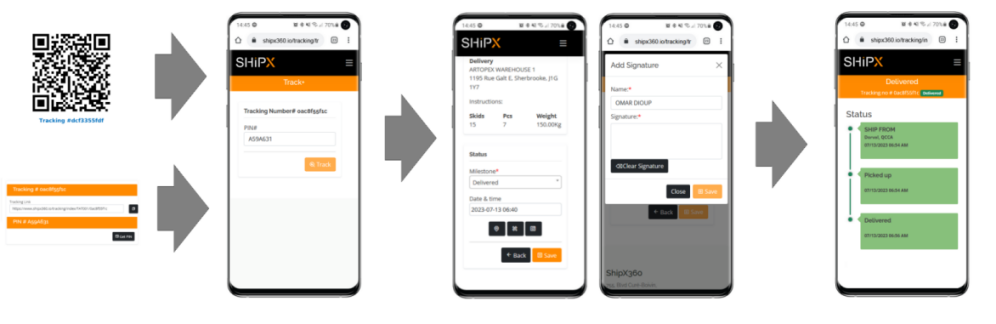
One of our biggest competitive advantages. Drivers receive a secure web link — no application to install, no user account required.
- 1 — Driver receives a secure link for the shipment
- 2 — Opens it directly in any smartphone browser
- 3 — Submits Proof of Delivery, signature, photos and notes
- 4 — Completes milestones on the spot
Works directly from any smartphone browser. Ideal for subcontracted and occasional carriers who will never install your app.
Carrier Instructions
Detailed Carrier Instructions
Give every carrier the operational detail they need to execute without back-and-forth calls.
- Customs instructions
- Border crossing information
- Appointment requirements
- Warehouse instructions
- Customer-specific requirements
- Special handling procedures
Reduce dispatch mistakes by putting the right instructions in front of the right carrier, every time.
 How It Works
AI Carrier Invoice Recognition
Carrier invoices arrive in every format imaginable and all of them get typed in by hand. Attach the PDF and let AI pull the details out for you.
- Carrier, invoice number and dates captured from the document
- Amounts and taxes extracted, ready for review
- Bill of lading and booking references picked up automatically
- Scanned invoices read as easily as digital ones
- Less keying, fewer typos, faster turnaround on carrier bills
Extracted details are placed in the invoice for you to review and correct before saving. Requires AI integration to be enabled.


Know Which Loads to Chase This Morning
You are accountable for freight on someone else's truck. Ask the Control Tower to review what is in motion and it comes back with the exceptions and which ones to chase first.
- Spot loads running late before the customer calls
- Catch delivered loads still waiting on a signed POD
- See open loads by status and the workload carried by each carrier or driver
- Flag files whose carrier cost has run past what you billed, for users with accounting access
- Open any load from the list and work in priority order
Each review runs when you ask for it and ends with a call list, not a dashboard to interpret. Insights respect each user's operational and accounting permissions. Requires AI integration to be enabled.
How a Document Moves
From Incoming Emails to Organized Load Documents
A brokered load generates paperwork on both sides, and most of it arrives by email. SHIPX gives it one place to land, a way to identify it, and queues that keep billing moving.
- Receive documents as email attachments at a dedicated address, or upload them yourself
- Ask AI to read a document and suggest its type and the load it belongs to
- Sort documents into queues — PODs, carrier invoices, customs papers and more
- Attach a POD to its load once you have confirmed the match
- Prepare a draft carrier invoice from a document in the invoice queue
- See what needs a person: references that did not match, and processing errors
- Keep customer and carrier paperwork on the same load, from dispatch to invoicing
Nothing is filed behind your back — a document moves when someone confirms it. The sooner the POD is on the load, the sooner you can bill.

Carrier Rate Management
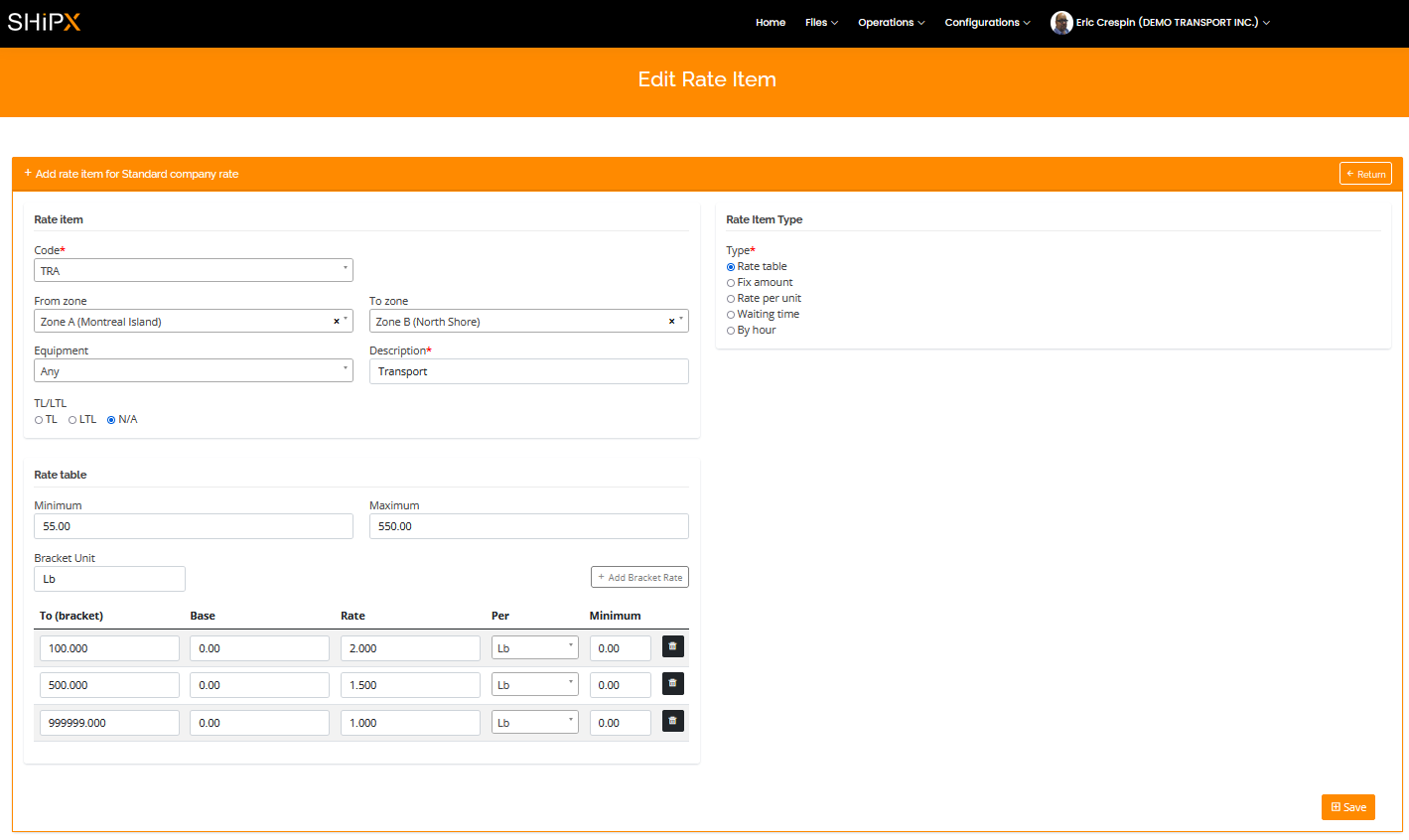
Maintain negotiated carrier rates and automatically calculate transportation costs — supporting your customer pricing while controlling carrier expenses.
- Maintain negotiated rates by carrier, lane and equipment
- Automatically calculate transportation costs on dispatch
- Support customer pricing while controlling carrier expenses
Transportation Accruals
Transportation Accrual Accounting
Automatically create transportation accruals before carrier invoices arrive, so your books are never waiting on paperwork.
- Automatic accrual creation at dispatch or delivery
- Improved month-end financial reporting
- Accurate profitability, even before invoices land
Profitability Analysis
Shipment Profitability
Track revenue versus carrier costs and analyze margins across every dimension of your brokerage.
- Revenue vs. carrier cost on every shipment
- Margin analysis by shipment, customer, lane and carrier
- Know which freight is actually profitable
Insurance Monitoring
Carrier Insurance Monitoring
Track insurance expiration dates and receive alerts before policies expire — reducing compliance risk across your carrier base.
- Insurance expiration dates tracked automatically
- Alerts before policies expire
- Reduced compliance risk across your network
Complete Brokerage Workflow
Everything managed from one integrated platform.
Powerful Broker Features
Everything a modern freight brokerage needs, in one platform.
Why Brokers Grow with SHIPX
Business outcomes, not just software features.
Built for Modern Freight Brokers
SHIPX combines everything brokers need into a single platform.
No disconnected software. No duplicate data entry. One complete operational platform.
Ready to Modernize Your Brokerage?
SHIPX gives truck brokers the tools they need to move more freight, automate operations and increase profitability.
Schedule a Demo Contact Sales